


How Do You Clear Cache In Internet Explorer
As the founder of Enabla Technology, an Australian IT Managed Services Provider, I know that a smooth internet browsing experience is essential for businesses with 20–250 staff. From accessing web pages and websites to troubleshooting Webex issues, your team’s efficiency depends heavily on how well your browser cache is maintained. In this extended guide, I’ll explain what the Internet Browser Cache is, why clearing it is important, and provide detailed instructions for Microsoft Internet Explorer, including versions like Internet Explorer 8, Internet Explorer 10, and Internet Explorer 11, as well as tips for other web browsers such as Google Chrome, Mozilla Firefox, Apple Safari, Microsoft Edge, Brave, and Opera browser.
What is Browser Cache and Why It Matters
The Web Browser Cache (also called the Internet Explorer cache) stores cached images and files, Temporary Internet Files, and other website data on your hard disk. This helps load web pages faster on subsequent visits. While useful, over time this stored cache information can lead to:
- Page loading errors.
- Inconsistencies with updated content.
- Website issues such as failed registration attempts or conflicts.
Cookies and Cache
Cookies are different—they store preferences, per-session cookies, and login details. Cookies useful for convenience may also become outdated, leading to errors or security alerts. Clearing cookies and cache together often resolves browsing history window glitches.
Why Clear Cache in Internet Explorer?
- Fix website issues and remove inconsistencies.
- Improve internet browsing performance.
- Enhance privacy by removing cookie files, form data, and passwords.
- Free up space in your Windows Operating System.
- Resolve Webex site or meeting problems.
Step-by-Step Guide for Internet Explorer
Method 1: Tools Menu
- Open Microsoft Internet Explorer.
- Click the Tools icon (also called the Gear Icon or Cog button) in the upper-right corner.
- Select Internet Options from the Tools drop-down menu.
- On the General tab, under Browsing history, click Delete….
- In the Delete Browsing History dialog box, check:
- Temporary Internet Files and website files
- Cookies and website data
- History
- Download history
- (Optional) Form data and Passwords
- Uncheck Preserve Favorites website data if you want a full clear.
- Click the Delete button.
- Close Internet Explorer and restart to ensure all changes take effect.
Method 2: Keyboard Shortcut
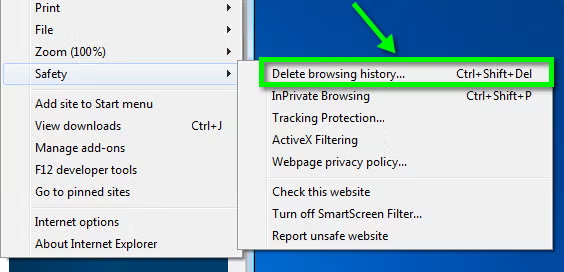
Press Ctrl + Shift + Delete to directly open the Delete browsing history window. This is the fastest way to clear cache in Internet Explorer 11 or Internet Explorer 10.
Troubleshooting and Advanced Options
- Use InPrivate Filtering or ActiveX Filtering for added security.
- Clear the DNS cache using Windows Explorer or Command Prompt (e.g.,
ipconfig /flushdns). - If cache won’t clear, consult the Microsoft Knowledge Base or Guided Help.
- For administrators, Import/Export Wizard and Internet Properties allow advanced management.
Clearing Cache in Other Browsers
| Browser | Method |
|---|---|
| Google Chrome | Ctrl + Shift + Delete → Clear browsing data |
| Mozilla Firefox | Ctrl + Shift + Delete → Clear recent/all history |
| Microsoft Edge | Ctrl + Shift + Delete → Clear browsing data |
| Apple Safari | Safari menu → Preferences → Privacy → Manage Website Data |
| Brave / Opera browser | Similar to Chrome steps |
For macOS X Snow Leopard and later, clear DNS using mDNSResponder or dscacheutil in the Terminal app.
Conclusion
Clearing your Internet Browser Cache regularly prevents website conflicts, keeps browsing experiences smooth, and ensures security. Whether you’re fixing Webex issues or improving internet content loading, this step should be part of your monthly IT maintenance.
For help with browser settings, security alerts, or business-wide IT policies, contact Enabla Technology. We provide support resources, guided help, and ticket-based troubleshooting to keep your team productive.
Support Files & Resources:


Leave a Reply